Yawffer

Yawffer
License:
Free
Language:
English
Developer:
Developer's website
OS:
WinXP/Vista
Added:
See detailed info

Softonic review

Elena Santos

“Track system performance right on your dekstop”

by Elena Santos about Yawffer

I'm not particularly very worried about the usage of CPU or RAM memory on my system, but if you are, this is the tool for you.

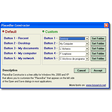
Yawffer displays four simple, very specific bits of information about the computer load: current time, CPU usage, hard disk usage and available RAM memory. You can fully customize the appearance of these four strings of text by changing their layout, position, font and color.

But that's not all. Yawffer still has an ace up its sleeve in the shape of two extra tools you can access by right-clicking on the program's icon in the system tray. With these two tools you can check current network connections and also freeze any selected process, which comes in especially handy when you're trying to find out which process is eating so much resources.

Overall Yawffer is a useful app for those who like to keep an eye on their system performance. It's a pity you can only track four elements.

With Yawffer you can have basic data about system load always in sight, plus check network connections and freeze suspicious processes.


Pros
  • Easy to configure
  • Customizable appearance
  • Displays network connections
  • Allows you to freeze processes
Cons
  • Can only track four elements
Free Download Yawffer 1.0

Yawffer is virus free

We have analyzed the latest version of Yawffer with 30 antivirus engines and it is virus free. See analysis results.

TESTED VIRUS FREE - Softonic GUARANTEED

Review and rate Yawffer

Your avatar

Your opinion is important.
Help other users - be the first to review this program.

Review
  1. Maximum: 75 characters

  2. See example

Pros and Cons
Rate
  1. What rating would you give Yawffer?

    You need to fill in all fields

    • Usability:

      Not rated
    • Stability:

      Not rated
    • Installation:

      Not rated
    • Functionality:

      Not rated
    • Appearance:

      Not rated
    • Overall rating:

      Not rated
  2. Don't worry, we won't make your email address public.

You're not allowed to share serial numbers, cracks, etc. or link to pages that contain them. If you do, your user account will be deleted, your IP address logged and legal action will be taken.

Get started - just ask a question!

Write a title for your question.

Alternativesto Yawffer

  • In English:
    Informer
    Informer

    Access various technical information about your PC

    Softonic rating:
    • 8/10
    User rating:
    • 5/10
  • Better rating:
    ProcX
    ProcX

    Excellent task manager to check system active processes

    Softonic rating:
    • 9/10
    User rating:
    • 9/10
Compare with Yawffer
Download rank: System Monitoring

49 of 63

Softonic rating:
  • Not bad
  • 6/10
Your rating:
Your rating
  • 0

Review and rate this program

Top Downloads: System Monitoring

  • United States
  • Global

  1. Displays various stats about your motherboard

Reviews of Yawffer in other languages